Welcome to the October update! We skipped the September post, so this one covers both months: over 140 updates across eight releases.
The big themes: job evaluation that fits the scheme you already use, equal-value groups you can open, browse and simulate, a whole group of companies under one account, and a complete change history behind every employee. Admins also get new security controls they can hand straight to their IT and procurement teams.
Here’s the autumn at a glance, then the details.
September and October at a glance
| Area | What’s new |
|---|---|
| Job evaluation | Sum-of-points scoring and more ways to model the scheme you already use, grade bands you set evenly, progressively or by hand, and publisher frameworks that arrive locked |
| Work of equal value | Equal-value groups as pages of their own, with custom fields and a change log, and simulations that move people between positions, levels and groups before anything changes |
| Group structures | Several legal entities under one account, with access per entity, shared or local catalogues, and a full pay equity analysis for every entity |
| Employee history | Every change to an employee in one log, whether it came from the app, an import or your HR system, with bulk corrections that are audited |
| Offers and moves (early access) | Job offers and internal moves anchored to your pay bands, with the effect on your pay gap shown before you send |
| Home and reporting | A new Pulse strip with the figures you choose, and statutory reports that follow your scenario and match the dashboard |
| Security and scale | An exportable audit trail with your own retention period, session limits per organization, sign-in events and an access review export, tested at 50,000 employees |
Job evaluation that fits the scheme you already use
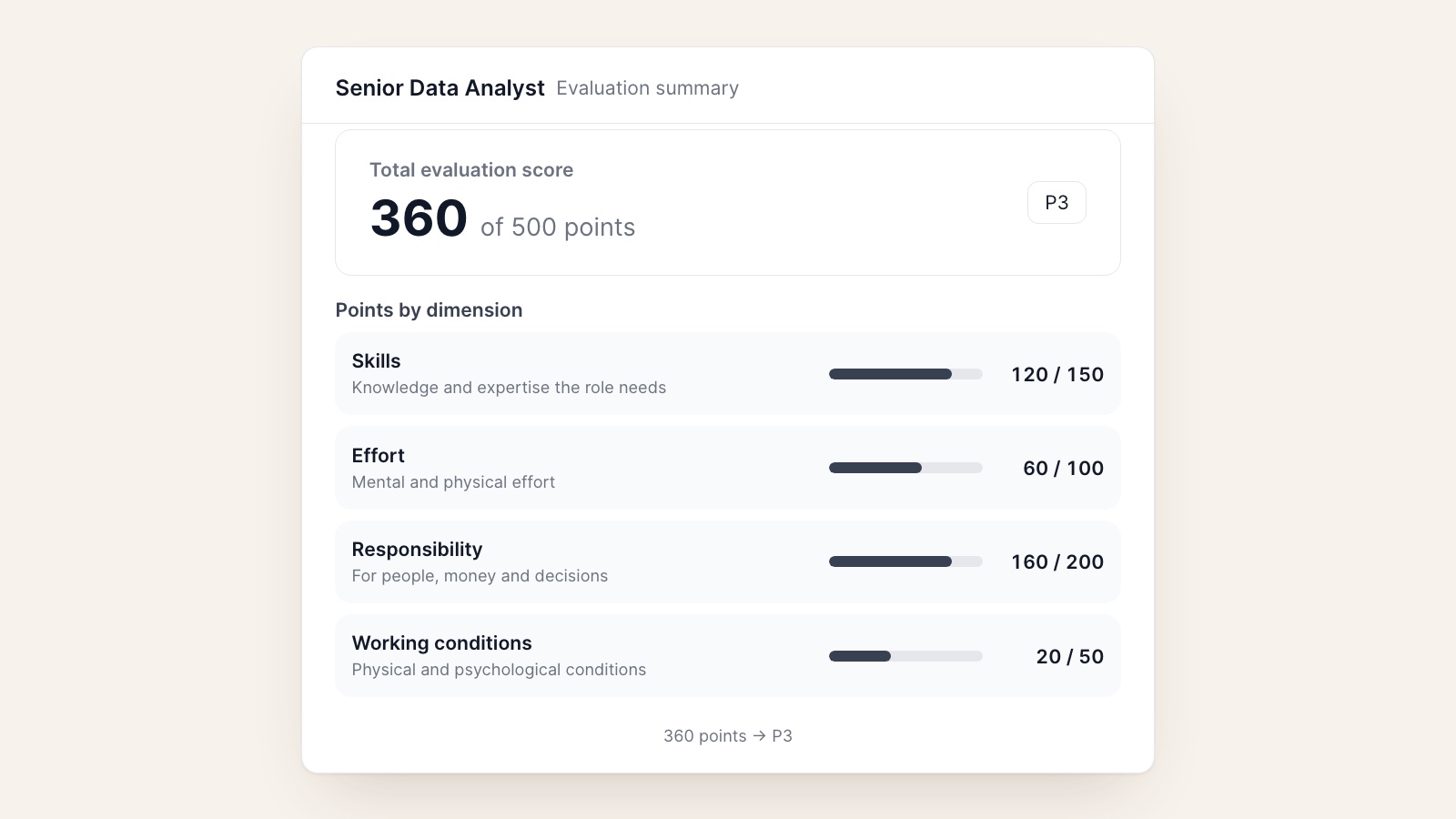
To compare roles of equal value, the directive expects gender-neutral criteria: skills, effort, responsibility and working conditions. Most organizations already have a job evaluation scheme that does exactly that, and many of those schemes don’t score with a simple weighted average. Until now, that meant bending your scheme to fit the tool. This autumn the tool learned to fit the scheme.
Evaluation frameworks now support more scoring models, so the scheme you already use can be modelled as it is instead of being bent to fit. Schemes built on sum-of-points scoring work as they do on paper: each factor level is worth a fixed number of points and totals stay on the scheme’s own scale. You edit points per level in a sheet that behaves like a spreadsheet, with a worked example on hand when you want to check the arithmetic.
Grades follow from the scores. The framework builder defines your job grades and applies them to the organization, and you set each grade’s point range evenly, progressively, or by typing the ranges yourself. Before you save band changes, a preview shows their effect, and every band change is audited. When an evaluation needs a judgement call, admins can set a manual total, with a required reason that stays on record.
We also added publisher frameworks. If your scheme comes from a consultancy or an industry body, it can be imported so its questions, scoring and rules stay read-only and can’t be exported, while you still manage your own bands and grades. On import you choose whether to adopt the publisher’s recommended grade architecture, map it to yours, or keep your own. And if you want line managers to evaluate positions in their own units, there’s now an organization setting for it, off by default.
In short: bring the job evaluation scheme you already trust, scoring rules and all, and Evenpay turns it into grades and equal-value comparisons without you rebuilding it.
Equal-value groups you can open, browse and simulate
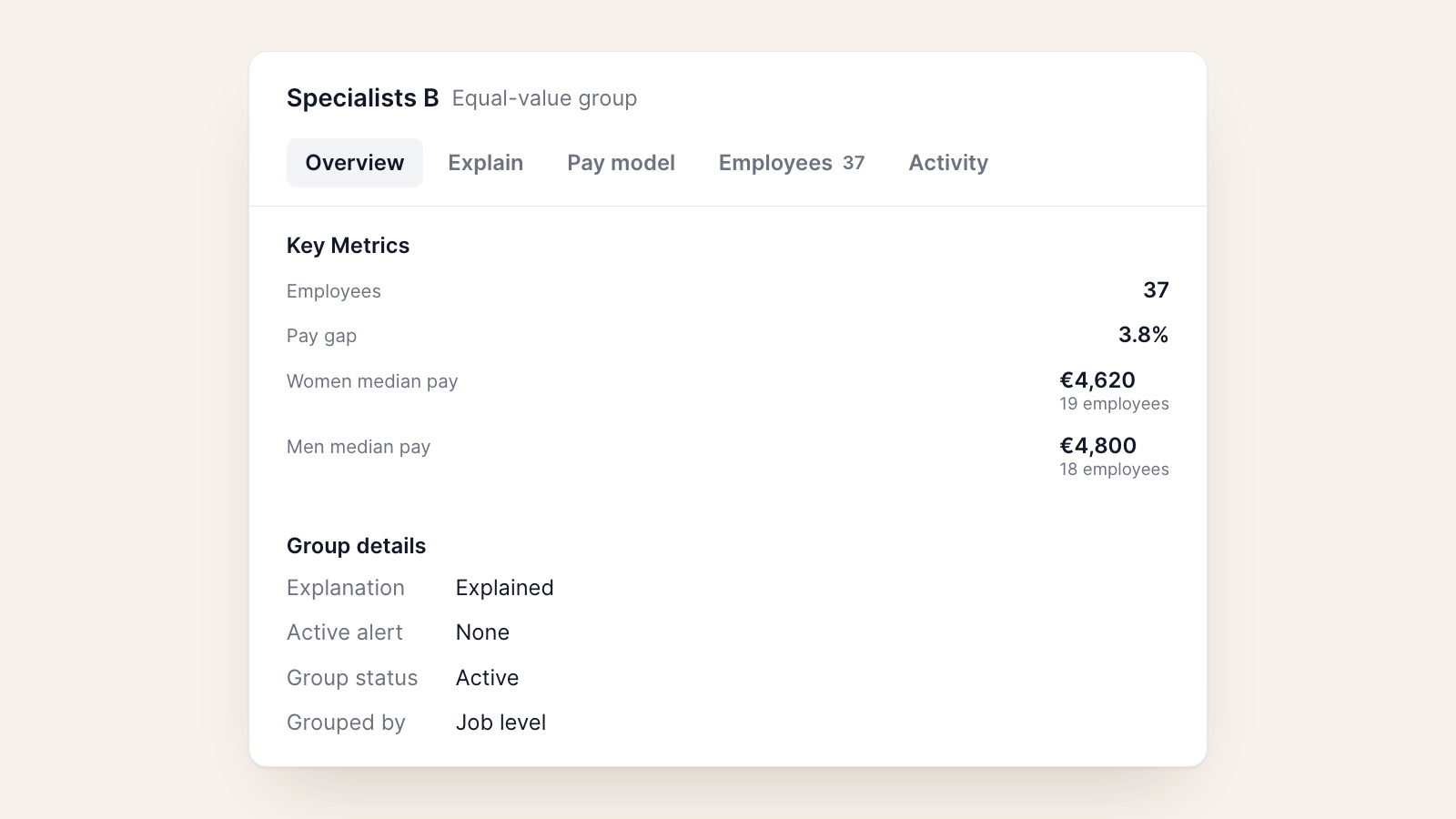
Work of equal value groups are where the directive’s comparisons actually happen, so they now have a home of their own. A new equal-value groups tab lists every group, and each group has a detail page with its members, pay figures and an activity log that records when the group was formed, changed or regrouped. You can add your own custom fields to groups, for example an owner or a review status, the same way you can for employees and positions. Groups smaller than your anonymity floor are marked as such, so nobody reads too much into a group of two.
Position is now a field you can use when defining equal-value groups. In pay equity simulations, you can now change an employee’s position, job level and number or yes/no custom fields, not only their pay, and see the result. The group cards compare today’s groups with the simulated ones, people a simulation moves into another group are marked as such, and the dashboard breakdowns follow the simulated details. If a moved employee has a pay rationale, the simulation shows it no longer applies in the new group and offers to carry it over.
In short: see who you compare with whom, track how those groups change, and test a reorganization or a promotion round before it touches anyone’s pay.
One account for a group of companies
The directive’s obligations, from reporting to joint pay assessments, sit with each employer. Many of our customers are groups with several legal entities, sometimes in several countries, and they need to answer for each company separately while keeping one view of the whole.
Evenpay now supports business entities. Your organization becomes a group with an entity tree below it, and each employee belongs to an entity, with the date they joined it, so a transfer between companies is recorded as it happened. Access can be granted per entity: an HR partner for one company sees that company, while group HR sees everything, and a switcher at the top moves between them. Catalogues such as job grades and pay components can be shared across the group, kept local to an entity, or both, and the group can lock settings an entity may not lower.
Pay equity follows the same lines. Once you have a second entity, equal-value groups are formed within each entity, every entity gets its own full analysis and its own scenarios, and you can use the entity as a pay factor where that makes sense. HR system connections can belong to the group or to one entity, with company codes mapped to entities, and backups and restores can be scoped to a single entity. An organization with a single entity works exactly as before.
In short: run every company in your group in one account, give each team access to its own data, and get a pay equity analysis for each employer the law asks about.
A complete history behind every employee
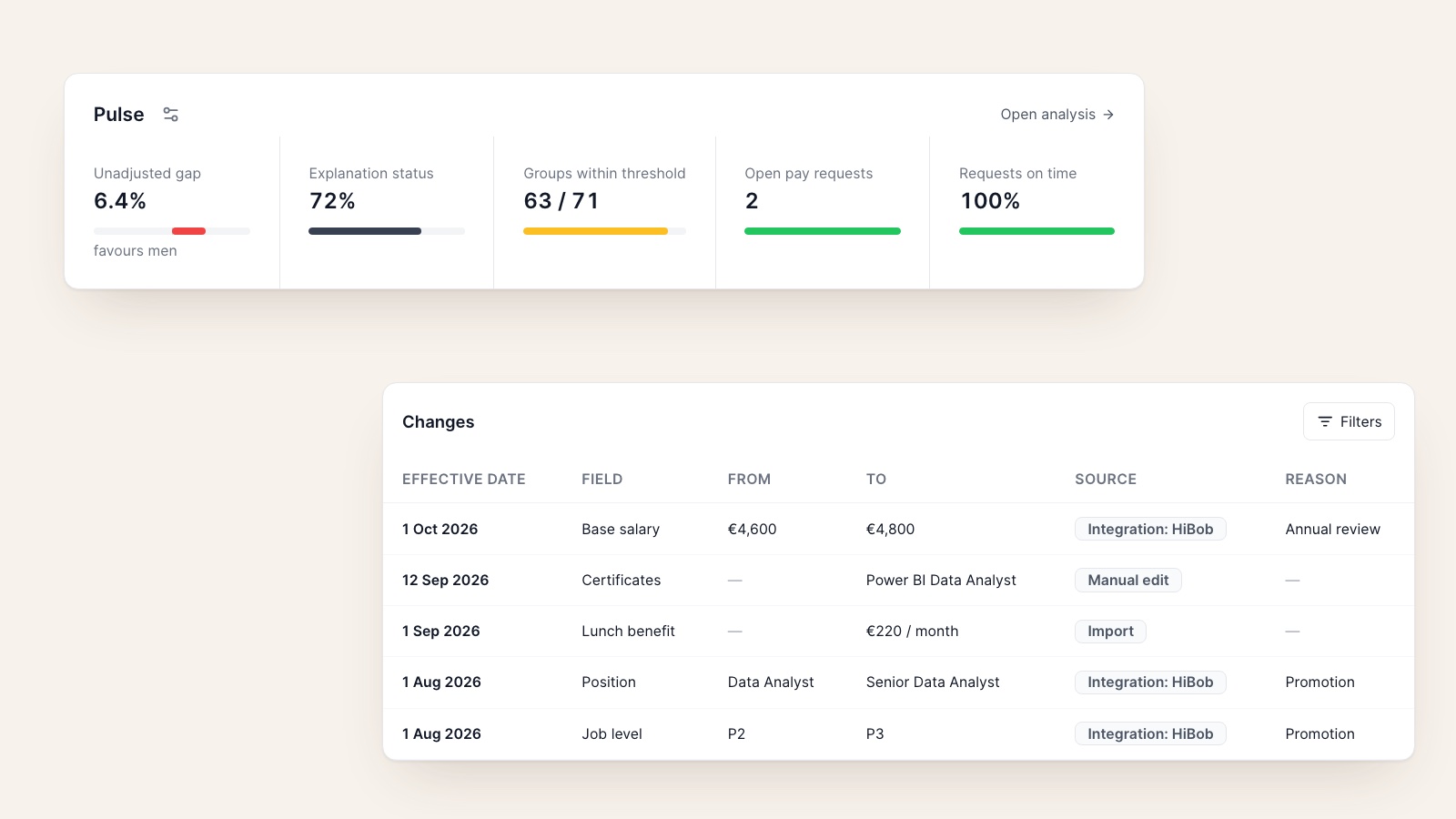
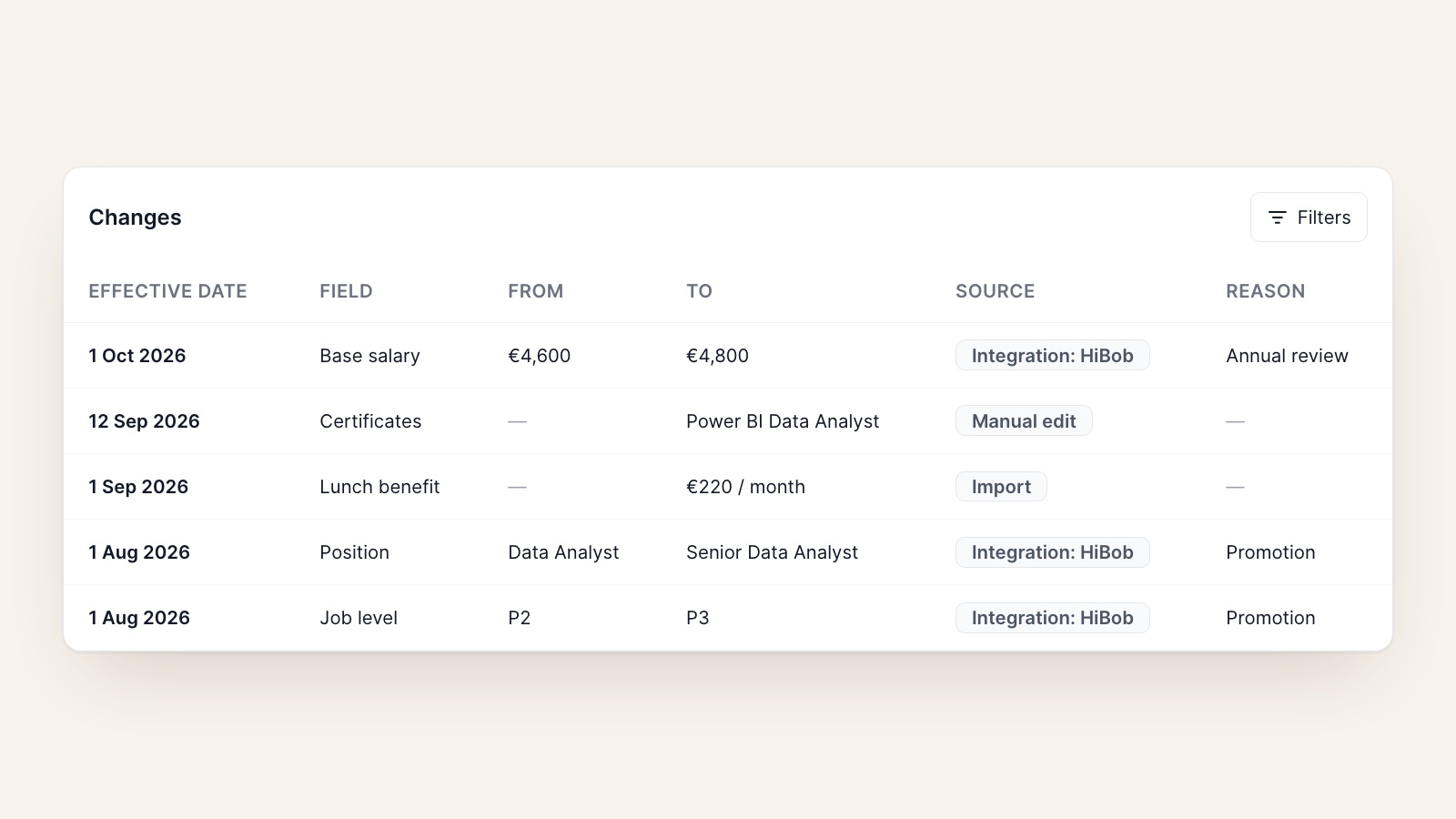
When an employee asks why their pay is what it is, or an auditor asks what changed and when, the answer usually lives in several places. The History tab on each employee now reads from one change log that records every change, whether it was made in Evenpay, came in through an import, or was synced from your HR system. You can filter by source and date, and benefit changes show their monthly value, not a technical summary.
The log also records changes to pay rationales, skills and certificates, in words an employee can read. When history itself needs correcting, for example after a bad import, you can select rows and delete them or set their effective date and reason in bulk. Current data stays untouched, and every correction is audited with the values it removed. The full log can be exported from Settings.
In short: every change to an employee, from every source, in one place, and corrections that leave their own trail.
Offers and moves, anchored to your pay bands
Pay gaps are often born at the moment of hire or promotion. Offers and Moves, now in early access, brings job offers and internal moves into Evenpay. Each offer is anchored to the position’s pay band and guided by a suggested range, and a panel beside the offer shows its verdict up front: whether it sits in the band and what it would do to your pay gap, with the reasoning a click away. Offers list who prepared them and what each pay component includes, can be withdrawn together, and are marked accepted when the candidate says yes. Until you save your own recruitment policy, a sensible default one guides every offer.
In short: check an offer against your bands and your pay gap before it goes out, not after the next analysis.
Pulse: the figures you care about, on the home page
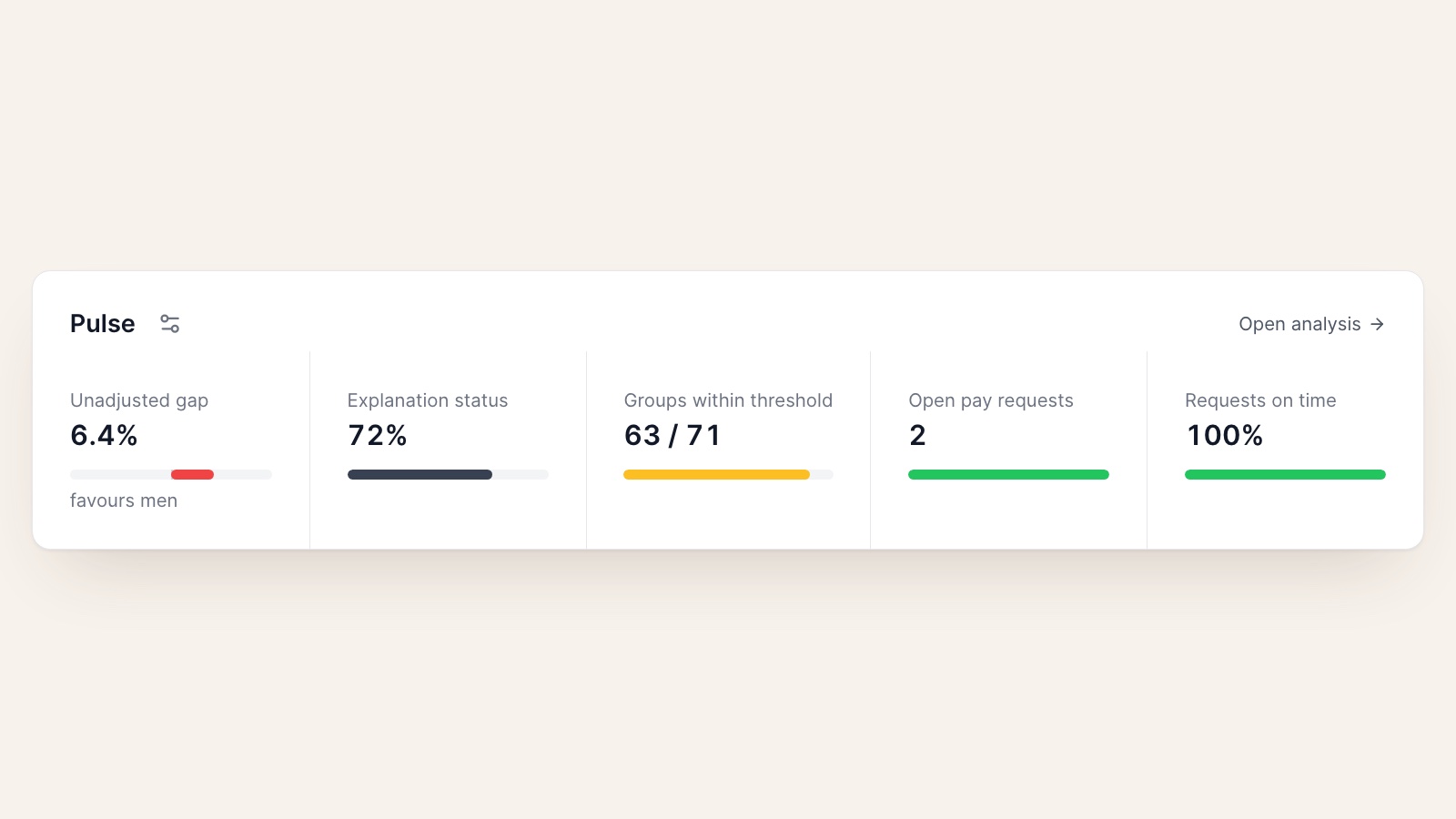
The home page has a new Pulse strip in place of the old gender pay gap overview. Pick up to six figures, such as the unadjusted and adjusted pay gap, how much of the gap is explained, how many groups sit within threshold, median compa ratio, the share of employees within their pay band, open pay information requests, and the share answered on time. Show them for the whole organization, a single entity, or a scenario. Each figure opens a card with its breakdown, how it’s calculated, its status, and what to do next. Your choice is saved for you.
In short: open Evenpay and see where you stand on the numbers you’re accountable for.
Security your procurement team will ask about
Pay data is some of the most sensitive data a company holds, and enterprise security reviews have grown more detailed. This autumn we added the controls those reviews ask about, so your admins can show them rather than describe them.
- Audit trail you can hand over. The audit log now names who did what and to whom, keeps the role the person held at the time, and shows exactly which value inside a record changed. You can request a full export, which is prepared in the background and emailed to you as an expiring link, and set your own retention period.
- Session limits per organization. Under Settings, Security, admins set an inactivity timeout (15 minutes to 12 hours) and a maximum session length (8 hours to 7 days).
- Sign-in events and access reviews. Sign-ins, organization switches and sign-outs, including timeouts, are recorded in the audit trail. A new user access export lists every member with their role, permissions, entity access, member-since date and last sign-in, ready for a periodic access review.
In short: the answers to your security questionnaire got shorter, because more of them are now “yes, and you can configure it”.
Improvements and fixes
The long list, grouped so you can skim to what’s relevant to you.
Integrations and imports
- HR system integrations can take any value from your system’s records, in JSON or XML, and every mapping is previewed against real records before it’s saved. Integrations can also carry the effective date of a change, so history lines up with when things actually happened.
- Integration filters can use employment-relationship fields.
- CSV import uses one importer with better column matching, reports exactly what it changed, shows each row’s own currency in the preview, and no longer insists on creating job grades you don’t want.
Analysis and reporting
- Statutory reports follow the scenario you report on.
- The regulatory report’s pay gap by category respects your grouping, and uses job levels and grades throughout.
- Pay comparison now includes the employee themselves in their peer group, matching the pay equity analysis, while the anonymity floor still counts only the others.
Pay information requests
- Pay information reports and HR-initiated emails go out in the channel’s default language, and request deadlines follow each channel’s settings.
Everyday polish
- Org units collapse, keep their indentation when names wrap, show headcount including sub-units, and use a tree to pick a parent.
- Merit cycles apply rule conditions correctly and attach position-specific pay bands to their positions.
- Users and roles show names instead of email addresses, empty job levels are hidden in country views, and tabs, section counts and badges look the same everywhere.
Scale
- We measured and tuned Evenpay at 15,000 to 50,000 employees: at 20,000 employees, CSV import runs about five times faster and the pay equity analysis about three times faster, and imports show their progress phase by phase.
Frequently Asked Questions
See it on your own data
That’s the October update. The thread through both months is structure: your evaluation scheme, your group of companies, and your employees’ history, all in a form you can show to someone else. If you’d like to see any of this against your own structure and numbers, schedule a demo and we’ll walk you through it. See you next month.